How to Create Your Creator Store in Minutes on JUNOONI
Learn how to launch your own creator merchandise store on JUNOONI in minutes. A step-by-step guide to setting up your profile, adding products and designs, pricing your merch and sharing your store with your audience.
JUNOONI Team
JUNOONI
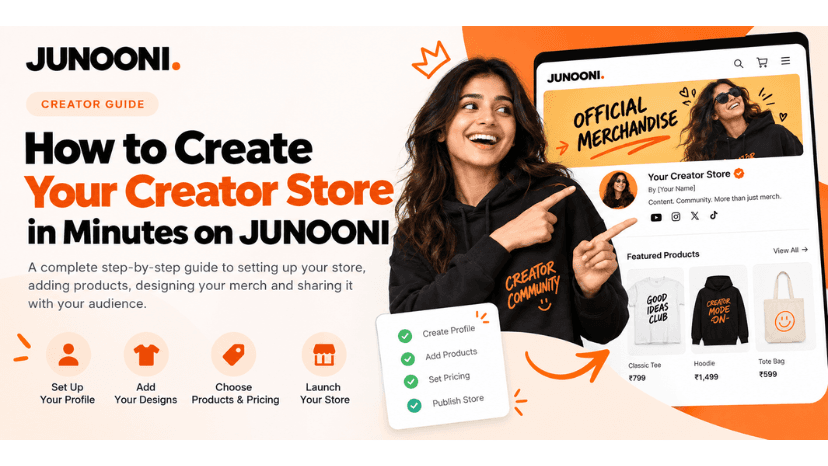
How to Create Your Own Creator Store in Minutes on JUNOONI
Learn how to launch your own creator merchandise store on JUNOONI in minutes. A step-by-step guide to setting up your profile, adding products and designs, pricing your merch and sharing your store with your audience.
Your content has a community. Give that community something to own.
Launch your own creator merchandise store with JUNOONI. Choose products, add your designs, set up your storefront, and share it with your audience—all from one place.
Create Your StoreYou do not need to build an ecommerce website from scratch to sell your own merchandise. With JUNOONI, creators can set up a dedicated store, select merchandise, customise their products, and share their store link with their audience. JUNOONI can also support production and fulfilment, helping creators focus on content, community, and growing their brand.
How do you create a creator store?
Sign in to JUNOONI Creator Studio, set up your creator profile, select the products you want to offer, add your designs and product details, review your storefront, and publish it. Once your store is ready, share its link with your followers and introduce your merchandise to your community.
1. What Is a Creator Store?
A creator store is an online storefront where a creator can offer products inspired by their content, personality, community, or personal brand. Instead of relying only on social media posts, collaborations, or brand partnerships, creators can build a dedicated place where their audience can explore and purchase merchandise connected to them.
Think of it as your own corner of the internet—one that brings together your name, your designs, and the products you want your community to wear, use, collect, or gift.
For example, a fitness creator might offer gym T-shirts and shaker bottles. A comedian might create slogan-based apparel. A gaming creator could offer oversized tees, caps, and desk accessories.
With JUNOONI, creators can build a merchandise storefront through Creator Studio and manage their products in one place.
The key idea: Your creator store is not simply a product catalogue. It is an extension of your creative identity and a way for your audience to connect with your work beyond the screen.
2. Why Should Creators Create Their Own Store?
Building an audience takes time. Creators consistently make content, engage with followers, experiment with formats, and develop a recognisable identity. A merchandise store gives that identity another format—something your community can experience in everyday life.
Build your own brand
Bring your name, visual style, catchphrases, and community culture together through products that feel personal to you.
Deepen community connection
Give followers a way to show their connection with your content, ideas, or creative identity.
Create another revenue stream
Merchandise can provide an additional way to earn from your creator brand, alongside other activities.
Offer products your way
Explore designs, product categories, collections, and limited drops that suit your content and audience.
Merchandise can make your identity tangible
A memorable line from a video, a phrase your audience repeats, or a symbol from your community can become the starting point for a product. When merchandise reflects something your followers already recognise, it can feel more meaningful than a generic product.
A store gives your audience one place to shop
A dedicated storefront gives your audience a single destination to browse your collection rather than having products scattered across posts and messages.
3. Who Can Start a Creator Store?
A creator store is not limited to one type of influencer or content category.
- Content creators: Build products around your content themes, signature formats, or recurring ideas.
- Comedians and entertainers: Turn memorable lines, jokes, and familiar expressions into merchandise.
- Fitness creators: Explore apparel, bottles, gym accessories, and motivation-led designs.
- Gaming creators: Develop apparel, accessories, and designs inspired by your gaming community.
- Artists and illustrators: Bring original artwork and creative concepts to physical products.
- Educators: Create products connected to learning communities or distinctive teaching styles.
- Lifestyle creators: Build collections around personal interests, aesthetics, and everyday routines.
- Podcast hosts: Develop merchandise inspired by the show, its themes, or phrases listeners recognise.
Start with your community, not just your follower count. A clear understanding of your audience and what makes your content distinctive can help you develop a more relevant merchandise collection.
4. What Should You Prepare Before Creating Your Store?
You do not need a fully developed merchandise brand before getting started. A few basic decisions can make the setup process smoother.
Choose your creator identity
Decide how you want your store to represent you — your creator name, channel name, podcast name, or a separate merchandise identity.
Collect your creative assets
Prepare any logos, artwork, illustrations, text designs, or visual elements you want to use. Make sure you have the rights or permission to use the material on products you intend to sell.
Quick preparation checklist
- Your creator or store name
- A profile image or logo
- A short introduction to your brand
- One or more product design ideas
- Product categories that fit your audience
- A plan to announce and share your store
5. How to Create Your Own Store on JUNOONI
JUNOONI is designed to help creators set up and manage their merchandise storefront through Creator Studio.
Open JUNOONI Creator Studio
Visit studio.junooni.com to access Creator Studio. Sign in or follow the registration process to get started.
Set up your creator profile
Add your creator or brand name, profile image, description, and other available profile information. Keep your profile clear and consistent with the identity your audience already knows.
Choose your merchandise
Explore the product options available and select categories that make sense for your audience — T-shirts, hoodies, caps, mugs, bottles, or tote bags.
Add your designs
Upload or apply your artwork to the products using the available product customisation workflow. Review placement, colours, and spelling carefully.
Add product details
Give each product a clear name and useful description. Provide accurate information about the product and available variants.
Review your storefront
Check your product titles, images, descriptions, available variants, and pricing. Open the store as a customer would on both desktop and mobile.
Publish and share your store
Once ready, publish your storefront and share the link with your audience through social media profiles, stories, videos, and community groups.
Your store is the starting point—not the finish line. After publishing, keep your product information up to date, listen to audience feedback, and use what you learn to refine future collections.
6. What Can You Sell in Your Creator Store?
Apparel
T-shirts, oversized tees, hoodies, and other clothing items featuring your artwork, catchphrases, illustrations, or brand identity.
Accessories
Caps, tote bags, bottles, mugs, and other accessories that extend your collection beyond clothing.
Community-led merchandise
A shared phrase, recurring joke, fan identity, or memorable moment can inspire a design that feels specific to your audience.
| Creator category | Possible merchandise ideas | Design direction |
|---|---|---|
| Fitness | T-shirts, bottles, gym accessories | Motivational, bold, minimal |
| Comedy | Slogan tees, hoodies, mugs | Witty, expressive, Hinglish |
| Gaming | Oversized tees, caps, accessories | Gaming references, community identity |
| Art and design | Apparel, totes, illustrated products | Original artwork, visual storytelling |
| Lifestyle | T-shirts, mugs, bottles, totes | Aesthetic, personal, everyday use |
| Podcast | Hoodies, mugs, slogan tees | Show identity, memorable phrases |
7. How Does Merchandise Production and Fulfilment Work?
JUNOONI offers a made-to-order, zero-inventory approach. Instead of requiring creators to purchase and store products in advance, products are produced in response to orders.
What fulfilment can include
- Preparing the ordered merchandise
- Printing or applying the approved design
- Quality checks according to the applicable process
- Packing the product
- Shipping the order to the customer
Why this matters: A made-to-order workflow helps creators focus more time on content, community engagement, and product ideas instead of managing boxes of unsold stock.
8. How Should You Price Your Merchandise?
Before setting a price, review the product's base cost, customisation or printing costs, fulfilment charges, applicable platform or payment fees, taxes, and any other relevant deductions.
Consider the full cost structure
- Product cost: The base cost of the blank item or product.
- Customisation: Printing, embroidery, or other design application costs, where applicable.
- Fulfilment and shipping: Costs associated with preparing and delivering the order.
- Payment processing: Applicable payment gateway charges.
- Taxes and other deductions: Any applicable tax or fee based on the transaction and current terms.
- Creator earning: The amount remaining for the creator after applicable costs and deductions.
Pricing reminder: Check the current product-specific costs and platform terms before publishing. Your displayed price and estimated earnings should be based on the latest information available to you.
9. How to Launch Your Creator Store
Publishing your store makes it available, but your audience still needs to discover it.
A simple launch timeline
- Before launch: Prepare Finalise your products, artwork, product details, pricing, and storefront presentation.
- Launch day: Introduce Share your store link and explain the idea behind your collection. Show your audience how to browse the products.
- After launch: Engage Respond to questions, share additional product content, and pay attention to feedback from your community.
- Later: Review and refine Review available store performance information and consider what you may want to update or create next.
Make your store link easy to find
Add your store link to relevant social media profile areas and include it in content where you introduce or discuss your merchandise.
10. How to Grow Your Creator Store Over Time
A creator store can evolve as your content, audience, and creative interests change.
Experiment with themed drops
Organise a drop around a particular idea, new content series, a community milestone, or a seasonal theme.
Invite useful audience feedback
Ask your audience which designs they connect with, what product categories interest them, or which ideas they would like to see explored.
Think long term: A creator store is something you can build on gradually. Start with a relevant collection, learn from your audience, and develop your next steps based on what you discover.
11. Common Mistakes to Avoid
Launching products without a clear connection to your brand
Before adding a product, ask whether the design and product make sense for your audience.
Starting with too many products
Consider starting with a focused collection and expanding when you have a reason to do so.
Ignoring pricing and costs
A price should be set with a clear understanding of applicable costs and deductions. Review the current product and fulfilment details before publishing.
Sharing the store only once
Consider introducing the store in different formats over time while keeping your communication relevant.
Expecting instant results
Give your store time to reach your community, pay attention to feedback, and make thoughtful improvements.
12. Building a Store Yourself vs. Using JUNOONI
| Area | Building independently | Using JUNOONI |
|---|---|---|
| Store setup | You arrange the website, store structure, and required integrations. | Use Creator Studio to set up your creator merchandise storefront. |
| Product selection | You source products and configure product listings. | Choose from the merchandise options available through the platform. |
| Designs | You organise the product customisation workflow. | Add designs using the available Creator Studio product workflow. |
| Inventory | You decide how to purchase, store, and manage stock. | Supported made-to-order workflows reduce the need to hold inventory. |
| Fulfilment | You arrange production, packing, and shipping. | JUNOONI fulfilment may be available for supported products and orders. |
| Store management | You maintain the website and connected services. | Manage your creator merchandise through Creator Studio. |
13. Creator Store Launch Checklist
Profile and storefront
- My creator or store name is clear
- My profile image or logo is ready
- My store description reflects my identity
- My storefront is easy to browse
Products and designs
- I have selected products relevant to my audience
- My artwork is suitable for the selected products
- I have reviewed design placement and spelling
- Product titles and descriptions are clear
- Available variants and product details are accurate
Pricing and fulfilment
- I have reviewed product-specific costs
- I understand applicable fees and deductions
- I have reviewed the available fulfilment terms
- I understand the relevant customer support and issue process
Launch and communication
- I have checked my store on mobile
- I have prepared a store announcement
- My store link is ready to share
- I have considered how to respond to audience questions
- I have a plan to review feedback after launch
14. Key Takeaways
- A creator store gives your audience a dedicated place to explore merchandise connected to your identity and content.
- You can begin with a small, focused collection instead of launching a large catalogue.
- Products should reflect your audience, creative direction, and community culture.
- JUNOONI Creator Studio provides a workspace for setting up your creator merchandise storefront.
- Supported made-to-order and fulfilment workflows reduce the need to manage inventory independently.
- Accurate product details, considered pricing, and a clear customer experience matter.
- After launch, audience feedback and store information can help you plan future improvements.
15. Frequently Asked Questions
1. How can I create my own creator store?
Visit JUNOONI Creator Studio, set up your creator profile, choose available merchandise, add your designs and product details, review your storefront, and publish it.
2. Do I need my own website to sell merchandise?
Not necessarily. JUNOONI can provide a dedicated merchandise storefront without needing to build a separate ecommerce website from scratch.
3. How long does it take to create a creator store?
The time required depends on how prepared your profile, artwork, product choices, and product information are. The store setup process is designed to be straightforward.
4. Do I need to buy inventory before launching?
JUNOONI supports a made-to-order, zero-inventory approach for applicable merchandise workflows. Review the current product and fulfilment options in Creator Studio.
5. What products can I sell through my creator store?
Merchandise options can include apparel such as T-shirts and hoodies, as well as accessories such as caps, mugs, bottles, and tote bags. Check Creator Studio for the current selection.
6. Can I use my own designs?
Yes. You can add your own artwork through the available product customisation workflow. Make sure you have the rights or permission to use any artwork you upload.
7. Can I create merchandise based on my catchphrases?
A catchphrase or recurring expression can be a useful starting point for a design, provided you have the necessary rights to use it.
8. Do I need design experience?
Design experience can be helpful, but it is not the only way to develop merchandise ideas. You can begin with a simple concept or work with a designer.
9. Can a small creator start a merchandise store?
Creators at different stages can explore merchandise. Consider your audience's interests and the strength of your community rather than focusing only on follower count.
10. How do I share my creator store?
Once your store is published, share its link through your social media bio, stories, videos, community posts, or other direct communication with your audience.
11. How do creators earn from merchandise?
Creator earnings depend on the product price, applicable product and fulfilment costs, platform terms, payment processing charges, taxes, and other relevant deductions. Review earning details in Creator Studio.
12. Who handles production and shipping?
JUNOONI offers fulfilment support for applicable products and workflows. The specific responsibilities and services depend on the option selected and the platform's current terms.
13. Can I add more products after launching?
You can manage and develop your collection based on the product management options available in Creator Studio.
14. Should I launch many products at once?
Not necessarily. A focused collection can make your first launch easier to present and manage. Expand your range as you learn more about your audience.
15. What should I include in my product descriptions?
Include a clear product name, an explanation of the design, useful product information, and accurate details about available variants.
16. Can I launch a limited-edition collection?
You can plan a themed or limited collection where the available product and store workflows support it. Make sure any availability statements you publish are accurate.
17. What if there is a problem with an order?
Follow the current order support and issue-resolution process provided by JUNOONI. Review the applicable policies for quality issues and shipping concerns.
18. Where can I get started?
Visit JUNOONI Creator Studio to explore the store setup process, or visit JUNOONI to learn more about the platform.
Your content has a voice. Let your merchandise tell its story.
Bring your ideas to life, create a collection that feels like you, and give your community a place to explore your merchandise with JUNOONI.
Share this post